Development
PhenomeDB is designed to be highly extensible to new methods.
Core platform architecture
PhenomeDB is a relatively complex application consisting of the following sub-systems:
Postgres database
Python library with modules for importing, harmonising, querying, normalising, and analysing the data. The code in these modules is organised into ‘tasks’ that can be chained together into pipelines using the PipelineFactory.
Redis cache (with a file-system backend extension) for storing query sets and analysis results
Apache-Airflow for running pipelines
Flask plugins for exploring the data, building queries, running analyses, and visualising results
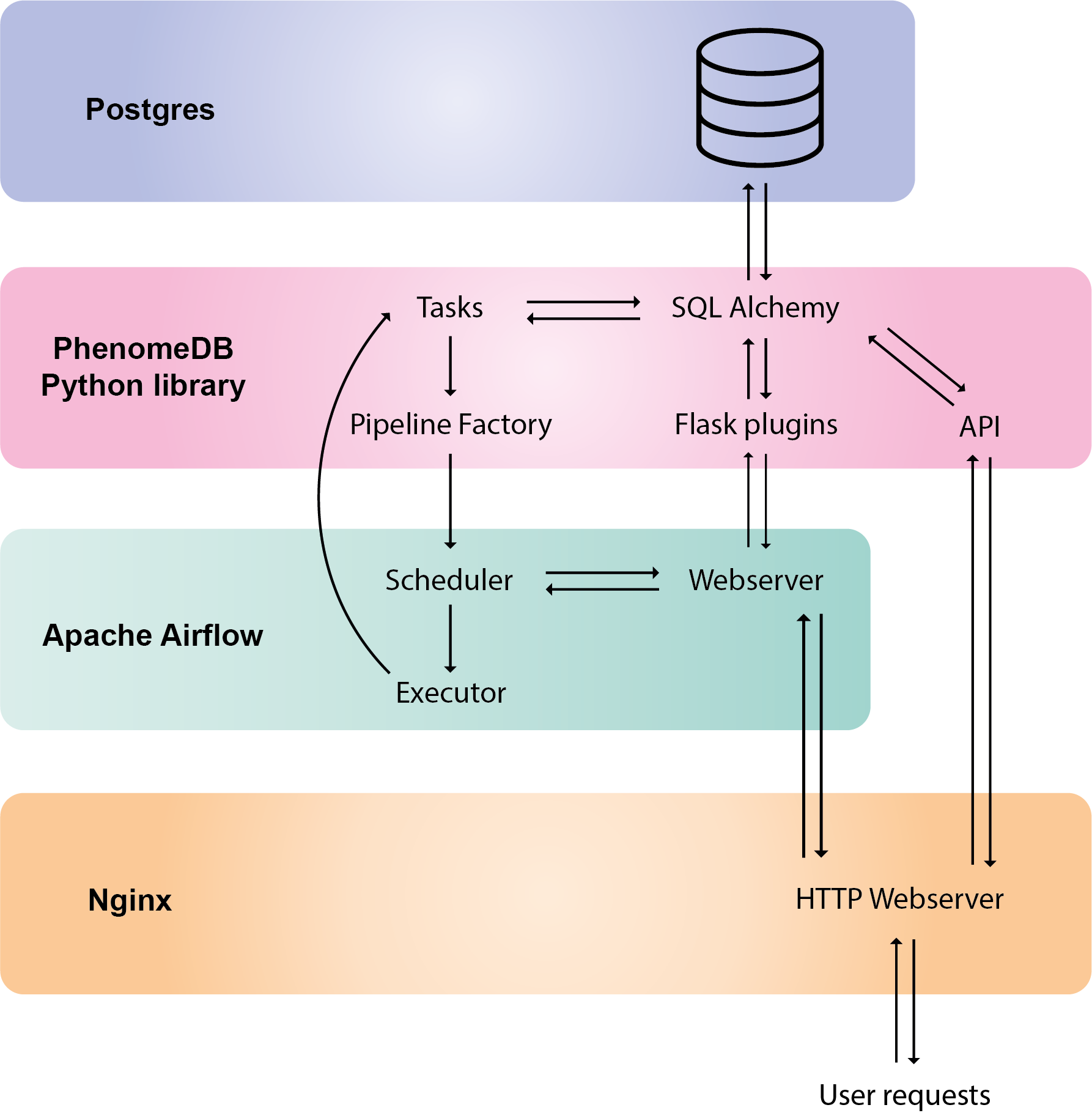
PhenomeDB core architectural components (note that important components Redis and the file-system are not shown here)
Adding tasks
To add new task, extend phenomedb.task.Task(), or for imports phenomedb.imports.ImportTask(), for annotation imports phenomedb.imports.AnnotationImportTask, for compounds the phenomedb.compounds.ImportCompounds() task.
For new analysis methods, extend the phenomedb.analysis.AnalysisTask, and R-based tools, the phenomedb.analysis.RAnalysisTask. The method method_specific_steps should be implemented.
Tasks are made available to the PipelineFactory, CLI, and UI via the ./phenomedb/data/config/task_spec.json file, a JSON file with parameters for each task option.
Each option in the method has a type (str, float, dropdown, file_upload, project), a label, type-specific arguments, and whether the parameter is required or optional.
For example, the entry for the phenomedb.imports.ImportPeakPantherAnnotations() method is:
{
"imports.ImportPeakPantherAnnotations": {
    "project_name": {"type":"project","label": "Project","required":true},
    "intensity_data_csv_path": {"type":"file_upload","label": "Intensity CSV file","remote_folder_path": "uploads","required": true,"project_folder": false},
    "sample_metadata_csv_path": {"type":"file_upload","label": "Feature Metadata CSV file","remote_folder_path": "uploads","required": false,"project_folder": false},
    "roi_csv_path": {"type":"file_upload","label": "PPR ROI CSV file","remote_folder_path": "uploads","required": false,"project_folder": false},
    "sample_matrix": {"type":"dropdown","label": "Sample matrix","options": {"serum": "serum","plasma": "plasma","urine": "urine","faecal": "faecal","organic tissue": "organic tissue","cell culture": "cell culture","nasal swab": "nasal swab"},"required": true},
    "assay_name": {"type":"dropdown","label": "Assay","options": {"LPOS": "LPOS","HPOS": "HPOS","RPOS": "RPOS","LNEG": "LNEG","RNEG":"RNEG"},"required": true},
    "roi_version": {"type":"float","label": "ROI version (eg 1.0)","required": true},
    "batch_corrected_data_csv_path": {"type":"file_upload","label": "Batch corrected data CSV file","remote_folder_path": "uploads","required": false,"project_folder": false}
  }
}
For more examples please look in the task_spec.json file.
Once added to the code and the type_spec.json, the task must be added to the interface by running the GenerateSingleTaskPipelines pipeline either via the Airflow interface, or simply by re-starting the docker containers (this is run at boot).
Building the docker images
The docker/custom_images folder contains the docker files for building the images.
The docker images can be built using the docker build command. To target both arm64 and x86_64 chipsets use the buildx command.
From the project root:
$ cp ./requirements.txt
$ cp requirements.txt ./docker/custom_images/phenomedb-airflow/
$ docker buildx build --platform linux/amd64,linux/arm64 -t phenomedb/phenomedb-airflow:latest --push ./docker/custom_images/phenomedb-airflow/
$ docker buildx build --platform linux/amd64,linux/arm64 -t phenomedb/phenomedb-api:latest --push ./docker/custom_images/phenomedb-api/