phenomedb.pipeline_factory
Pipelines can be created, registered with Airflow, and executed via the phenomedb.modules.PipelineFactory. Using this approach removes the requirements for manually writing Airflow DAG files.
Overview
The phenomedb.modules.PipelineFactory is the interface between the user and the PipelineManager (the default of which is the AirflowPipelineManager). The PipelineFactory provides a standardised interface to creating Pipelines. Pipelines are created by add Tasks to a pipeline, and then committing them and then executing them.

Overview of how the phenomedb.modules.PipelineFactory can be used to create Apache Airflow pipelines
User Interface
The PipelineFactory UI can be used to created parameterised, hard-coded Pipelines/DAGs made of many tasks (executed sequentially).
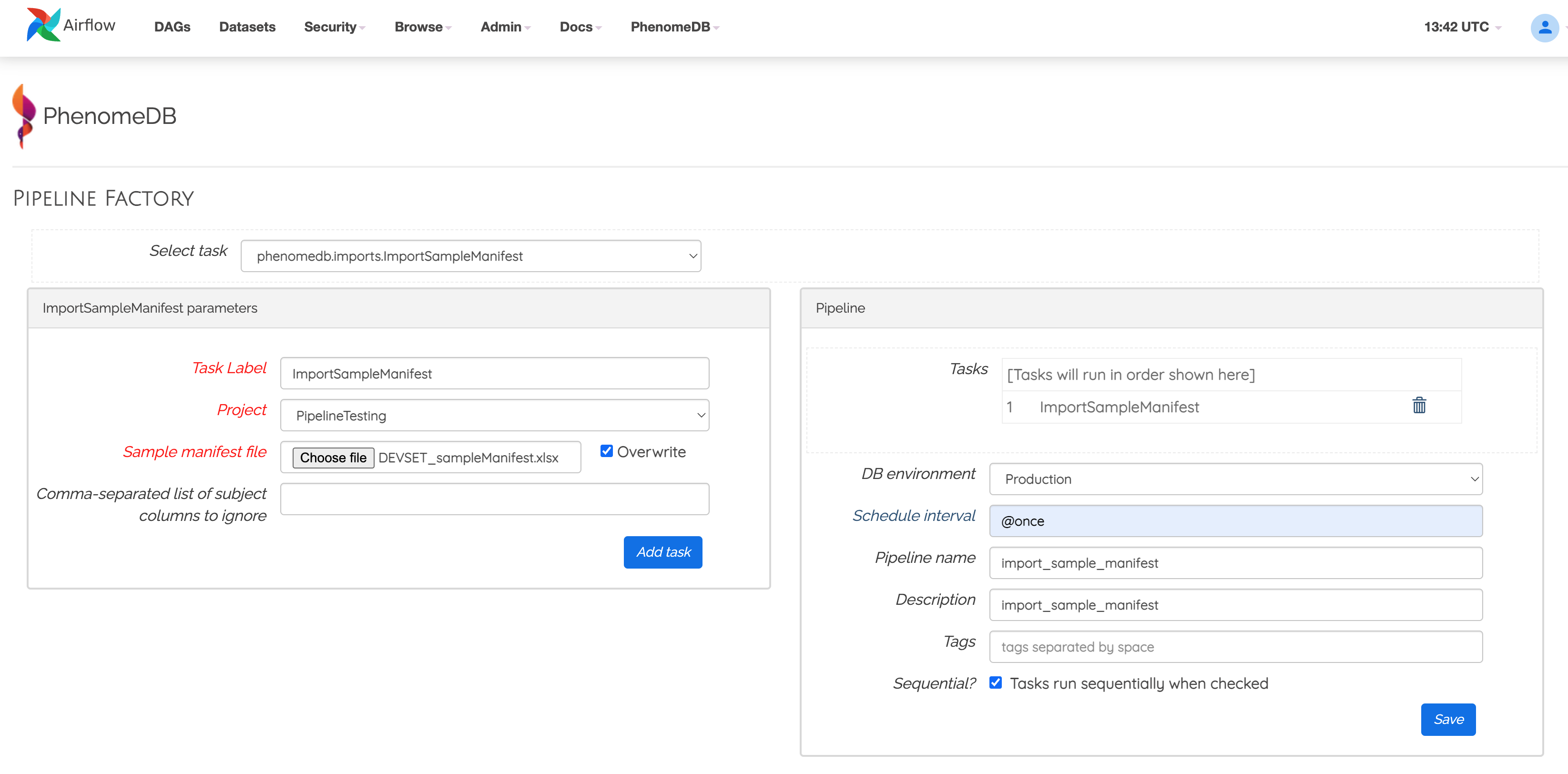
Example of using a the phenomedb.modules.PipelineFactory UI to create a parameterised pipeline
Python API
The phenomedb.modules.PipelineFactory Python API has more flexibility in creating a phenomedb.models.Pipeline, as it can be used to create two kinds of phenomedb.models.Pipeline, dynamic, or hard-coded.
Hard coded: The pipeline parameters are injected into the DAG file, so each instance of a Pipeline will be specific to one project, for example. These are the kinds of Pipelines the UI builds.
Dynamic: The pipeline is created with no parameters, to be executed with a run_config (of the same JSON structure as running pipelines through the Airflow UI)
These options are specified using the hard_coded parameter of the phenomedb.modules.PipelineFactory
pipeline_factory = PipelineFactory(pipeline_name='Example hard-coded Pipeline',
                                   description='An Example hard-coded Pipeline',
                                   hard_coded=True)

# Import a Sample Manifest (could use ImportMetadata instead for CSV files)
pipeline_factory.add_task('phenomedb.imports', # module
                          'ImportSampleManifest', # class
                           task_id='importsamplemanifest', # unique per pipeline
                           run_config={
                                "project": "PipelineTesting",
                                "sample_manifest_path":config['DATA']['test_data'] + 'DEVSET_sampleManifest.xlsx',
                                "columns_to_ignore": ['Further Sample info?'],
                                "username": "admin"}
                           )
# Import Bruker IVDr annotations
pipeline_factory.add_task('phenomedb.imports',
                          'ImportBrukerIVDrAnnotations',
                          task_id='importbrukerivdrannotations',
                          upstream_task_id='importsamplemanifest',
                          run_config={
                                "project": "PipelineTesting",
                                "sample_matrix": "plasma",
                                "annotation_method": "Bi-LISA",
                                "unified_csv_path": config['DATA']['test_data'] + 'DEVSET_P_BILISA_combinedData.csv',
                                "username": "admin" }
                           )

# Import Bruker IVDr Bi-LISA annotation metadata
pipeline_factory.add_task('phenomedb.compounds',
                          'ImportBrukerBiLISACompounds',
                          task_id='importbilisacompounds',
                          upstream_task_id='importbrukerivdrannotations',
                          run_config={
                                "bilisa_file": config['DATA']['test_data'] + 'ivdr-bilisa-all.csv',
                                "username": "admin"}
                          )

# Harmonise the metadata (just one field in this example, add one HarmoniseMetadata task per field to be harmonised)
pipeline_factory.add_task('phenomedb.metadata',
                          'HarmoniseMetadata',
                          task_id='harmoniseage',
                          upstream_task_id='importbilisacompounds',
                          run_config={
                                "project": "PipelineTesting",
                                "metadata_field_name": "age",
                                "harmonised_metadata_field_name":"Age",
                                "inbuilt_transform_name":"simple_assignment",
                                "allowed_decimal_places":0,
                                "username": "admin" }
                           )

pipeline_factory.add_task('phenomedb.metadata',
                          'HarmoniseMetadata',
                          task_id='harmonisesex',
                          upstream_task_id='harmoniseage',
                          run_config={
                                "project": "PipelineTesting",
                                "metadata_field_name": "gender",
                                "harmonised_metadata_field_name":"Sex",
                                "lambda_function_string":"lambda x: 'Male' if x.lower().strip() == 'm' else ('Female' if x.lower().strip() == 'f' else 'Unknown' )",
                                "username": "admin" }
                           )

# Create a SavedQuery that will target the data (in this case those individuals under 40).
# Note: When importing annotations, a SavedQuery will be created targeting the imported FeatureDataset

query_factory = QueryFactory(query_name='PipelineTesting IVDr under 40', query_description='test description')
query_factory.add_filter(model='Project', property='name', operator='eq', value='PipelineTesting')
query_factory.add_filter(model='Sample', property='matrix', operator='eq', value='plasma')
query_factory.add_filter(model='Assay', property='name', operator='eq', value='NOESY')
query_factory.add_filter(model='AnnotationMethod', property='name', operator='eq', value='Bi-LISA')
query_factory.add_filter(MetadataFilter('Age','lt',value=40)))
saved_query = query_factory.save_query()

# Add a task to create the SavedQuery dataframe cache for the query
# As this it IVDr, we use the raw values (correction_type=None)
# If we were targeting LC-MS PeakPantheR data, we would use the SR-corrected data (correction_type='SR')
# By default it will harmonise the intensities to mmol/L
pipeline_factory.add_task('phenomedb.cache',
                          'CreateSavedQueryDataframeCache',
                          task_id='createquerycache',
                          upstream_task_id='harmonisesex',
                          run_config={
                                "saved_query_id": saved_query.id,
                                "username": "admin" }
                          )

# Run a PCA with default params
pipeline_factory.add_task('phenomedb.analysis',
                          'RunPCA',
                          task_id='runpca',
                          upstream_task_id='createquerycache',
                           run_config={
                                "saved_query_id": saved_query.id,
                                "username": "admin" }
                           )

# Run an Bonferroni-corrected linear-regression MWAS where harmonised Age is the outcome-of-interest and harmonised Sex is a covariate
pipeline_factory.add_task('phenomedb.analysis',
                          'RunMWAS',
                          task_id='runmwas',
                          upstream_task_id='runpca',
                           run_config={
                                "saved_query_id": saved_query.id,
                                "model_Y_variable": "h_metadata::Age",
                                "model_X_variables": ["h_metadata::Sex"],
                                "method": "linear",
                                "correction_method": "bonferroni",
                                "username": "admin" }
                           )

# Write out the hard coded DAG and register with Airflow
pipeline_factory.commit_definition()

# Run the Pipeline (may block while waiting for Airflow to register the Pipeline)
pipeline_factory.run_pipeline()
The equivalent Pipeline could also be dynamically executed using the following approach
pipeline_factory = PipelineFactory(pipeline_name='Example dynamic Pipeline',
                                   description='An Example dynamic Pipeline',
                                   hard_coded=False)

# Import a Sample Manifest (could use ImportMetadata instead for CSV files)
pipeline_factory.add_task('phenomedb.imports',
                          'ImportSampleManifest',
                           task_id='importsamplemanifest')

pipeline_factory.add_task('phenomedb.imports',
                          'ImportBrukerIVDrAnnotations',
                          task_id='importbrukerivdrannotations',
                          upstream_task_id='importsamplemanifest')

# Import Bruker IVDr Bi-LISA annotation metadata
pipeline_factory.add_task('phenomedb.compounds',
                          'ImportBrukerBiLISACompounds',
                          task_id='importbilisacompounds',
                          upstream_task_id='importbrukerivdrannotations')

# Harmonise the metadata (just one field in this example, add one HarmoniseMetadata task per field to be harmonised)
pipeline_factory.add_task('phenomedb.metadata',
                          'HarmoniseMetadata',
                          task_id='harmoniseage',
                          upstream_task_id='importbilisacompounds')

pipeline_factory.add_task('phenomedb.metadata',
                          'HarmoniseMetadata',
                          task_id='harmonisesex',
                          upstream_task_id='harmoniseage')

# Create a SavedQuery that will target the data (in this case those individuals under 40).
# Note: When importing annotations, a SavedQuery will be created targeting the imported FeatureDataset

query_factory = QueryFactory(query_name='PipelineTesting IVDr under 40', query_description='test description')
query_factory.add_filter(model='Project', property='name', operator='eq', value='PipelineTesting')
query_factory.add_filter(model='Sample', property='matrix', operator='eq', value='plasma')
query_factory.add_filter(model='Assay', property='name', operator='eq', value='NOESY')
query_factory.add_filter(model='AnnotationMethod', property='name', operator='eq', value='Bi-LISA')
query_factory.add_filter(MetadataFilter('Age','lt',value=40)))
saved_query = query_factory.save_query()

# Add a task to create the SavedQuery dataframe cache for the query
# As this it IVDr, we use the raw values (correction_type=None)
# If we were targeting LC-MS PeakPantheR data, we would use the SR-corrected data (correction_type='SR')
# By default it will harmonise the intensities to mmol/L
pipeline_factory.add_task('phenomedb.cache',
                          'CreateSavedQueryDataframeCache',
                          task_id='createquerycache',
                          upstream_task_id='harmonisesex',
                          )

# Run a PCA with default params
pipeline_factory.add_task('phenomedb.analysis',
                          'RunPCA',
                          task_id='runpca',
                          upstream_task_id='createquerycache'
                           )

# Run an Bonferroni-corrected linear-regression MWAS where harmonised Age is the outcome-of-interest and harmonised Sex is a covariate
pipeline_factory.add_task('phenomedb.analysis',
                          'RunMWAS',
                          task_id='runmwas',
                          upstream_task_id='runpca')

# Write out the hard coded DAG and register with Airflow
pipeline_factory.commit_definition()

# Build the dynamically parameterised run_config dictionary
run_config={
            "importsamplemanifest":{
                    "project": "PipelineTesting",
                    "sample_manifest_path":config['DATA']['test_data'] + 'DEVSET_sampleManifest.xlsx',
                    "columns_to_ignore": ['Further Sample info?'],
                    "username": "admin"
                    },
            "importbrukerivdrannotations":{
                        "project": "PipelineTesting",
                        "sample_matrix": "plasma",
                        "annotation_method": "Bi-LISA",
                        "unified_csv_path": config['DATA']['test_data'] + 'DEVSET_P_BILISA_combinedData.csv',
                        "username": "admin" }

                        "bilisa_file": config['DATA']['test_data'] + 'ivdr-bilisa-all.csv',
                        "username": "admin"
                    },
             "harmoniseage":{
                        "project": "PipelineTesting",
                        "metadata_field_name": "age",
                        "harmonised_metadata_field_name":"Age",
                        "inbuilt_transform_name":"simple_assignment",
                        "allowed_decimal_places":0,
                        "username": "admin"
                     },
             "harmonisesex":{
                        "project": "PipelineTesting",
                        "metadata_field_name": "gender",
                        "harmonised_metadata_field_name":"Sex",
                        "lambda_function_string":"lambda x: 'Male' if x.lower().strip() == 'm' else ('Female' if x.lower().strip() == 'f' else 'Unknown' )",
                        "username": "admin"
                     },
            "createquerycache":{
                        "saved_query_id": saved_query.id,
                        "username": "admin"
                     },
            "runpca":{
                        "saved_query_id": saved_query.id,
                        "username": "admin"
                     },
            "runmwas":{
                        "saved_query_id": saved_query.id,
                        "model_Y_variable": "h_metadata::Age",
                        "model_X_variables": ["h_metadata::Sex"],
                        "method": "linear",
                        "correction_method": "bonferroni",
                        "username": "admin" }
            }

# Run the Pipeline (may block while waiting for Airflow to register the Pipeline)
pipeline_factory.run_pipeline(run_config=run_config)
The dynamically parameterised run_config is the same format taken by the Apache-Airflow DAG config, so can be used to execute Dynamic pipelines from the interface
- class phenomedb.pipeline_factory.BasePipelineManager(pipeline_name=None, db_env=None, db_session=None, pipeline_id=None)
Abstract BasePipeline class. Extend this class to use another offline worker system, ie RedisQueue.
add_task() and submit() must be implemented.
- add_task(task_module, task_class, task_id=None, run_config=None, upstream_task_id=None)
Add a task to the pipeline, either with a run_config for the task or not, and with an upstream_task_id or not.
- Parameters:
task_module (str) – The module of the task, eg. ‘phenomedb.imports’
task_class (str) – The class of the task eg. ‘ImportMetadata’
task_id (str, optional) – The unique identifier for the task in the pipeline, defaults to None
run_config (dict, optional) – The run_config for the task, e.g. dictionary of {task_id:**kwargs}, defaults to None
upstream_task_id (str, optional) – The ID of the upstream task, defaults to None
- Raises:
PipelineTaskIDError – Another task with that ID already exists
PipelineTaskIDError – Task ID cannot start with a number
PipelineTaskIDError – Upstream task with that ID does not exist
- Returns:
_description_
- Return type:
_type_
- commit_definition()
Commit the definition using the PipelineManager
- run_pipeline()
Run the pipeline
- class phenomedb.pipeline_factory.PipelineFactory(pipeline_name=None, pipeline_id=None, description=None, start_date=None, pipeline_folder_path=None, default_args=None, hard_code_data=False, schedule_interval='None', db_env=None, db_session=None, tags=None, sequential=True, max_active_runs=100, concurrency=1)
PipelineFactory class. Default manager is apache-airflow. Most of the options below are airflow specific.
- Parameters:
pipeline_name (str) – The pipeline name - the main identifier of the pipeline, must be unique
pipeline_id – The
phenomedb.models.PipelineIDdescription (str, optional) – The pipeline description, defaults to None.
start_date (
datetime.datetime, optional) – The start date of the airflow pipeline, defaults to None.pipeline_folder_path (str, optional) – The path to the pipeline folder (default used otherwise)
default_args (dict, optional) – The default arguments of the airflow pipeline, defaults to {‘owner’: ‘airflow’,’retries’:1,’retries_delay’:datetime.timedelta(minutes=5)}.
hard_code_data (bool, optional) – Whether to create a dynamically parameterised pipeline or one with hard-coded parameters, default False (dynamic)
schedule_interval (str, optional) – How often to run the airflow pipeline, defaults to “@once”.
db_env (str, optional) – Which db to use - “PROD”,”BETA”, or “TEST”, defaults to None (“PROD”).
tags (list, optional) – The Airflow tags to add (for UI filtering), defaults to [].
sequential (bool, optional) – Whether to run tasks sequentially, defaults to True. False means tasks will run concurrently, in no specific order.
max_active_runs (int, optional) – How many active runs of a pipeline can there be
concurrency (int, optional) – How many concurrent runs of a pipeline can be executed
- add_task(task_module, task_class, upstream_task_id=None, run_config=None, task_id=None)
Add a task to the pipeline.
- Parameters:
task_module (str) – The module of the task.
task_class (str) – The class of the task.
upstream_task_id (int, optional) – If specified, specifies this task is downstream of the upstream_task_id, defaults to None
depends_on_past (bool, optional) – If specified, this will only run when upstream tasks complete, defaults to True
- Returns:
task_label: The label of the task.
- Return type:
str
- commit_definition()
Commit the definition of the pipeline
- Returns:
_description_
- Return type:
_type_
- delete_pipeline()
Delete the pipeline
- static get_json_task_spec()
Get the json task_spec
- Returns:
the json task spec dict
- Return type:
dict
- static get_tasks_from_json(modules_to_include=None)
Parse the tasks from the task_spec file
- Parameters:
modules_to_include (list, optional) – A list of modules to include, defaults to None
- Returns:
task_spec_json
- Return type:
dict
- pause_pipeline()
Pause the pipeline
- run_pipeline(run_config=None, debug=False)
Submit the pipeline to the queue.
- Returns:
success (True) or failure (False)
- Return type:
bool